
RTL website design means building a site whose reading direction runs from right to left, as in Hebrew and Arabic, and it goes much further than aligning text to the right. The page direction, the order of columns and menus, the side where icons and labels sit, the way forms and progress indicators flow and the way numbers and Latin words are embedded in sentences all change. Done well, the result feels native to a Hebrew reader and nobody notices the work behind it; done badly, it shows immediately as a menu on the wrong side, an arrow pointing backwards or a price that jumbles its own digits. This guide covers what to change, what to deliberately leave alone and how to test, with the practical choices we make when we build Hebrew and bilingual sites at nodev.
Start with direction, not with alignment
The foundation is the document direction. In HTML you set it with the dir attribute on the root element, together with the lang attribute, so a Hebrew page starts with <html lang="he" dir="rtl">. MDN documents the dir attribute and the W3C explains in its guidance on directionality in HTML why markup is the right place to declare it: the browser then handles text flow, punctuation placement, form fields, lists and table order consistently, without hand-written exceptions. Setting text-align: right in CSS on a left-to-right page is the shortcut that causes most of the problems, because the block order, the scrollbars, the bullets and the punctuation all remain wrong.
The second foundation is CSS that does not hard-code sides. For years, stylesheets used margin-left, padding-right or float: left, which means every rule has to be rewritten for the opposite direction. The CSS logical properties module replaces physical sides with flow-relative ones; MDN describes how properties that once accepted only top, bottom, left and right now also accept inline-start and inline-end, as explained in its reference on logical properties and values. With margin-inline-start in place of margin-left, one stylesheet serves both a Hebrew and an English version of the site. Flexbox and grid already follow the document direction, so a row of cards, a header with a logo and a menu, or a two-column section reverses on its own when the root direction changes. If your theme or page builder is full of fixed left and right values, expect to spend real time on it, and ask whoever builds your site how they handle this before you sign.
What to mirror and what to keep
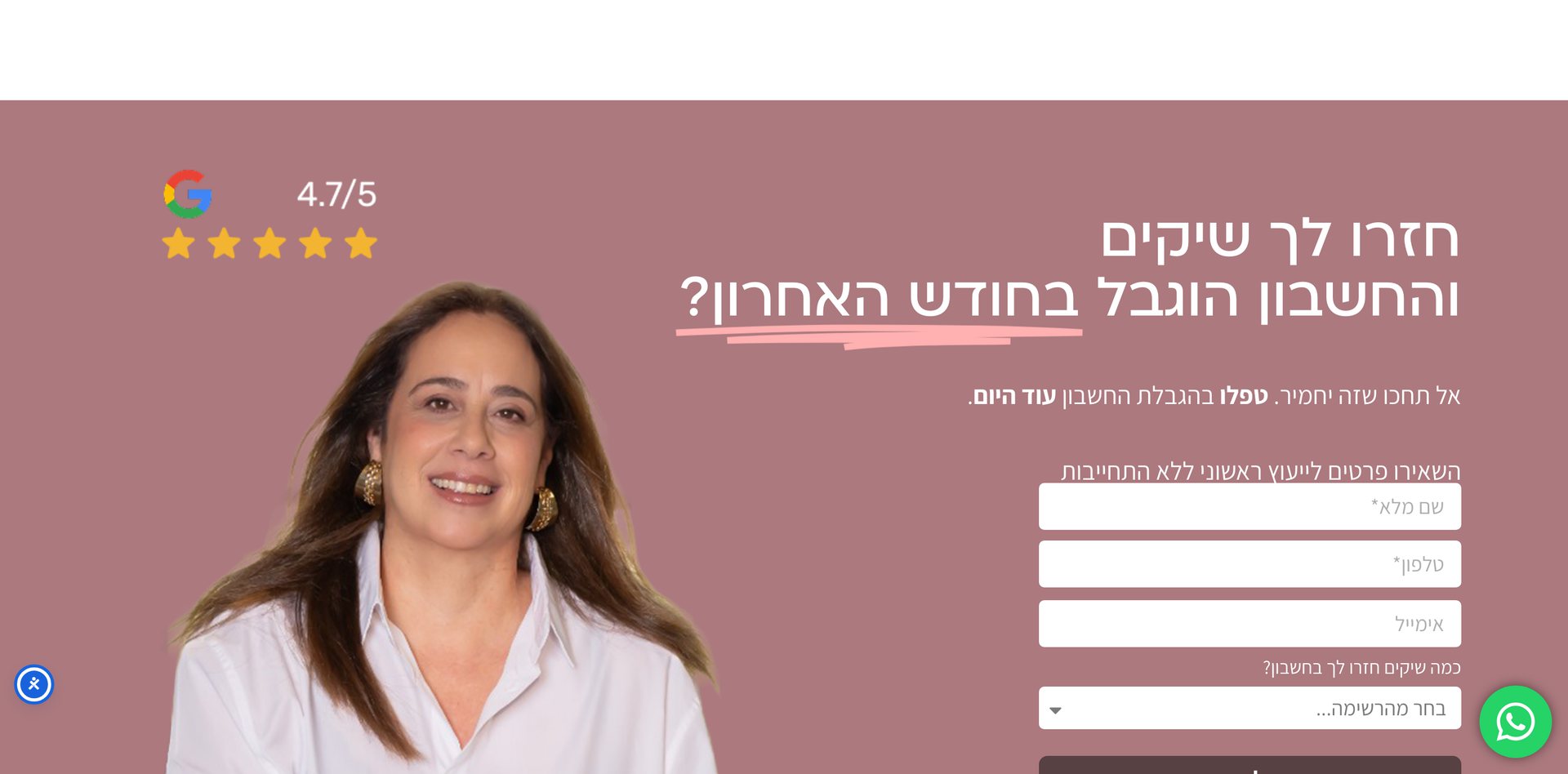
The common rule is to mirror the structure and keep the content. The logo normally sits at the start of the header, which is the right side in Hebrew, and the main menu reads from right to left. Sidebars move to the right, breadcrumbs run right to left with the separator pointing the same way, pagination goes from the right, and a form’s labels sit on the right of their fields. Sliders and carousels should advance in the reading direction, so the first slide is on the right and the “next” button is on the left. Progress steps in a checkout or an enquiry form should also start on the right, otherwise the visitor reads step one last.
Icons need judgement rather than a blanket flip. An arrow that means “next”, “back” or “open the menu” points in the direction of reading and therefore must be mirrored, while a magnifying glass, a phone, a padlock or a company logo should not be, because mirroring them makes them look wrong or changes a brand mark. Controls that represent physical or universal conventions, such as the play button on a video or the hands of a clock, generally keep their orientation. Photographs follow the same logic: an image of a person looking toward the text works better when the composition leads the eye into the page, so choose a version of the picture for each direction instead of flipping the file, which can reverse writing on signs and clothing. Our guide to bilingual Hebrew–English websites explains how to keep one design system for both directions without compromising either.
Typography is the part where Hebrew deserves its own decisions. Hebrew has no capital letters, so the hierarchy that an English headline gets from uppercase has to come from size and weight. Many fonts designed for Latin script include a Hebrew set that is thinner, wider or visually mismatched, so choose a typeface with a well-drawn Hebrew alphabet and check it at body size on a phone. Italics are rarely used in Hebrew running text, and long lines are tiring, so keep the text column readable. Give Hebrew a slightly generous line height, since the letters carry vowel marks and ascenders that look cramped at tight settings.
The mixed-direction problems that break real sites
Pure Hebrew text is the easy part. The bugs appear where right-to-left and left-to-right content meet, which happens constantly on commercial sites: an English brand name in a Hebrew sentence, a phone number, a price with a currency symbol, a product code, a URL or an email address. Browsers apply the Unicode Bidirectional Algorithm to decide how these pieces are arranged, and neutral characters such as hyphens, slashes, brackets and punctuation take their direction from the text around them, which is how a phone number like “03-1234567” or a title ending in a Latin word can appear with its parts in the wrong order.
The reliable fix is to isolate the embedded fragment instead of fighting the symptom with spaces and special characters. HTML has the bdi element for exactly this case, and MDN’s page on the bdi element shows how an item listed with a dash and a number is garbled when the name is right-to-left and not isolated, and fixed when it is wrapped. MDN also notes that the same effect can be achieved with the CSS unicode-bidi: isolate, but recommends the element because it is semantic and browsers may ignore CSS styling. In practice, wrap user-generated names, product codes and any text whose direction you do not control, and give phone numbers, email addresses and URLs an explicit left-to-right direction, so they display correctly and can still be copied.
Forms deserve a dedicated pass. Fields for emails, URLs, passwords and phone numbers should be left-to-right even on a Hebrew page, while name and message fields follow the page direction. Placeholders, validation messages and the dropdown lists generated by plugins are often untranslated or displayed on the wrong side, and the confirmation emails that your site sends are usually a separate template that also needs dir="rtl". Date pickers, quantity steppers, sliders for price ranges and star ratings should be checked one by one, because third-party widgets are where an otherwise correct layout falls apart.
Key takeaway Declare direction in the HTML, write CSS with logical properties instead of left and right, mirror the structure but not every icon or image, and isolate embedded Latin text, numbers and codes. Then test every form and third-party widget on a phone.
Search, multilingual structure and testing
A right-to-left version of a site is usually part of a multilingual setup, and the SEO rules are the same as for any other language. Each language version should have its own URL, the page should declare its language, and the versions should reference each other with hreflang annotations, as Google describes in its documentation on localized versions of your pages. Do not rely on automatic browser translation, and do not mix Hebrew and English in the same page. A clean URL structure, such as a /he/ folder for the Hebrew version, helps both visitors and crawlers, and Hebrew slugs are fine as long as the URLs are encoded and consistent.
Testing is where most right-to-left projects are won or lost, and it has to be done by someone who reads the language. A developer who cannot read Hebrew will not notice a swapped sentence order, a mistranslated button or an arrow that points the wrong way. Review the site on real phones, because most Israeli traffic is mobile, and go through the full journey: home page, menu, a service page, contact form, confirmation and the email you receive. Check the browser’s zoom and the larger text sizes as well, since a layout that works at default size can break when text expands. Run an accessibility check too, because screen readers rely on the language and direction attributes to pronounce and order content correctly.
We apply these rules on every Hebrew and bilingual project, and you can see how they look in practice in our portfolio. If you are comparing agencies, our guide to choosing a web design agency in Israel lists the questions worth asking, and the services page describes what we build, from showcase sites to online stores and custom applications.
Frequently asked questions
What is RTL website design?
It is the design and development of a website for languages written from right to left, such as Hebrew and Arabic. It includes setting the page direction, mirroring the layout and navigation, handling icons and images properly, and making sure numbers and Latin text display correctly inside right-to-left sentences.
Is it enough to align the text to the right?
No. Right-aligned text on a left-to-right page leaves the menu, columns, forms, punctuation and scrollbars in the wrong order. The correct approach is to set dir="rtl" in the HTML and write CSS that follows the direction instead of fixed left and right values.
Which icons should be mirrored in a Hebrew site?
Icons that express direction, such as next and back arrows, should be mirrored. Objects such as a magnifying glass, a phone or a padlock, brand logos, and conventions such as a video play button generally stay as they are.
Why do phone numbers and prices sometimes look jumbled on Hebrew pages?
Browsers decide the order of neutral characters, such as hyphens, brackets and slashes, from the surrounding text. When a number or Latin word sits inside a Hebrew sentence it can be rearranged. Wrapping it in a bdi element or giving it an explicit left-to-right direction solves it.
Does a Hebrew version need hreflang tags?
If the site has more than one language version, yes. Hreflang annotations tell Google which page is intended for which language, and each version should point to the others as well as to itself.
Building a Hebrew or bilingual website? Tell us about your project and the languages you need, and we will propose a layout that reads naturally in both directions. Contact us to get started.